Private agreement & e-signature

Sign it. Seal it. Pop it.

PopDF sends your document for agreement and signature without any leakage. The document is encrypted in your browser, every signer gets their own secure and private link, and once everyone has agreed and signed, everyone can securely download a sealed copy. Then the document pops: deleted from our servers for good.

No app to installWorks on any phoneWe can't read your documents
Why PopDF exists

Most e-signature services keep a readable copy of your contract on their servers. PopDF can't read yours and never stores it in readable form. And the moment everyone has their own sealed copy, it's gone.

The whole loop, in under a minute

Confirm your email → upload → drag fields → share links → sign on a phone → sealed & signed. Recorded in the real product.
How it works

Four steps.
Zero snooping.

01

Upload & drop fields

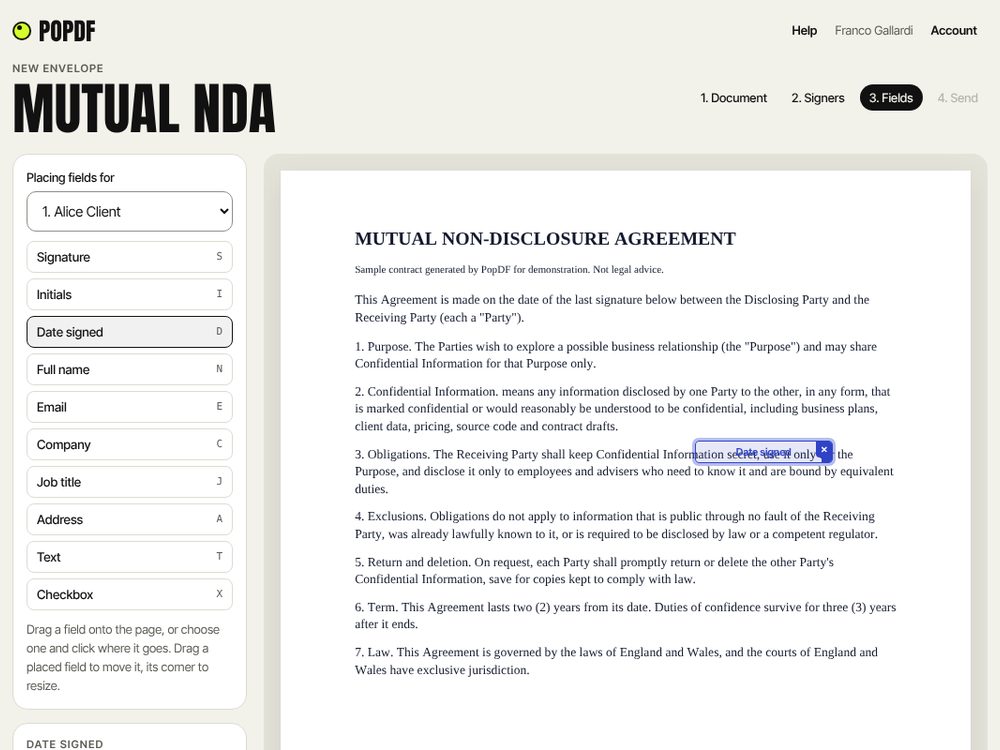
Confirm your email with a 6-digit code (no account, no password), then drag in any doc or PDF up to 8 MB. Still agreeing the wording? Upload a Word document and edit it together with the other parties until everyone presses Agree. Once agreed, it becomes signable. Drag or click to place signature, initials, date, name, company, text and checkbox fields, all colour-coded per signatory. Move them, resize them, mark them required.

  • Up to 20 signers per envelope
  • Any order, or a strict signing order
  • Keyboard shortcuts for every field type
The field editor: fields dragged onto the contract for each signatory, colour-coded
02

Share private links

Your browser encrypts the document before it leaves your device and turns it into encrypted private links. These can then be sent or shared by email, WhatsApp, Teams or QR code.

  • Copy a ready-written message
  • Live status: opened, signed, declined
  • Your owner's dashboard can manage it all
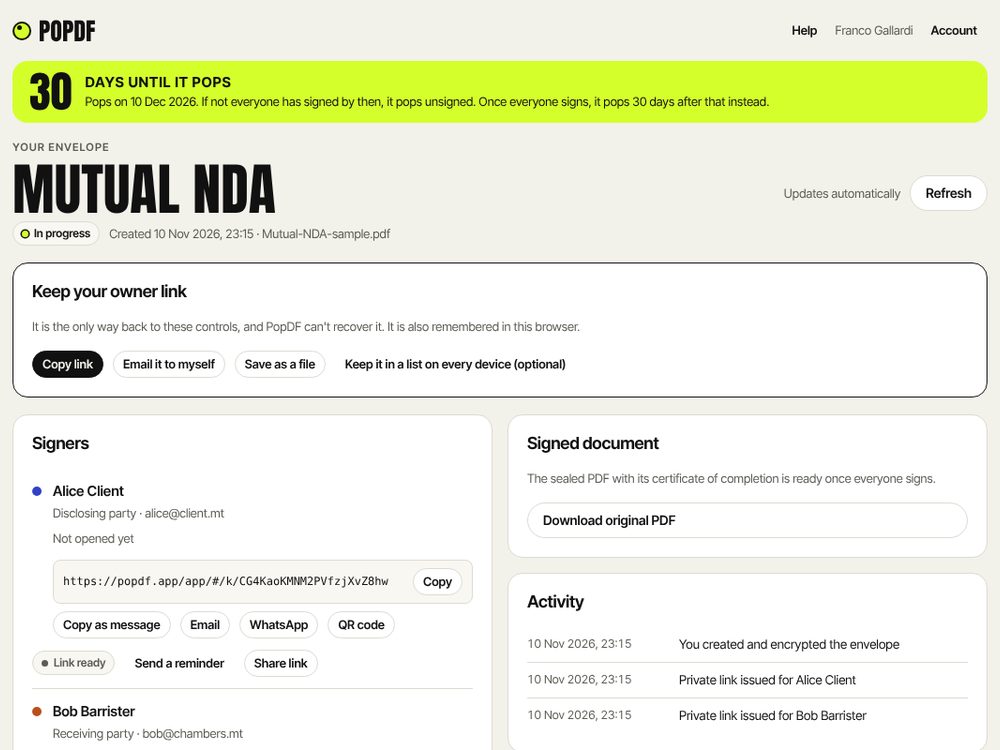
The sender's envelope page: the countdown to when it pops, the owner link to keep, the signers and a private signing link
03

Sign anywhere

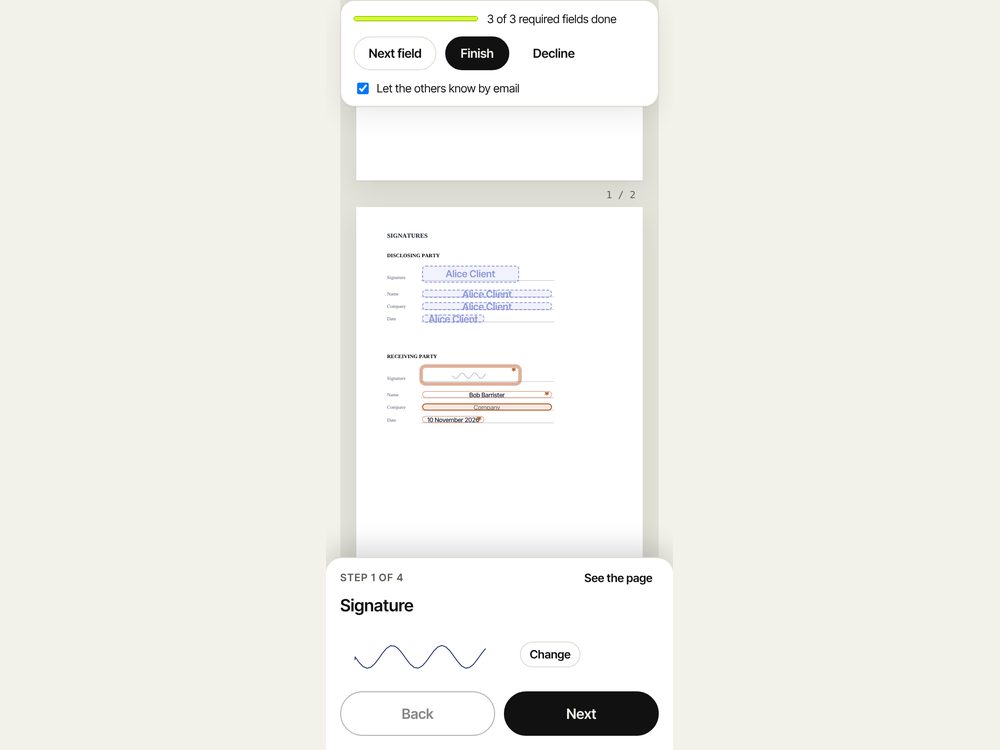
Signers open on any phone or laptop. No app to install, no account. On a phone, PopDF guides you through one field at a time. Type, draw or upload a signature, agree to sign electronically and it’s all done in under a minute.

  • Guided "next field" flow
  • Decline with a reason, privately
  • Works on any phone or laptop
A signer on a phone, guided one field at a time, with a drawn signature
04

Seal it. Then pop.

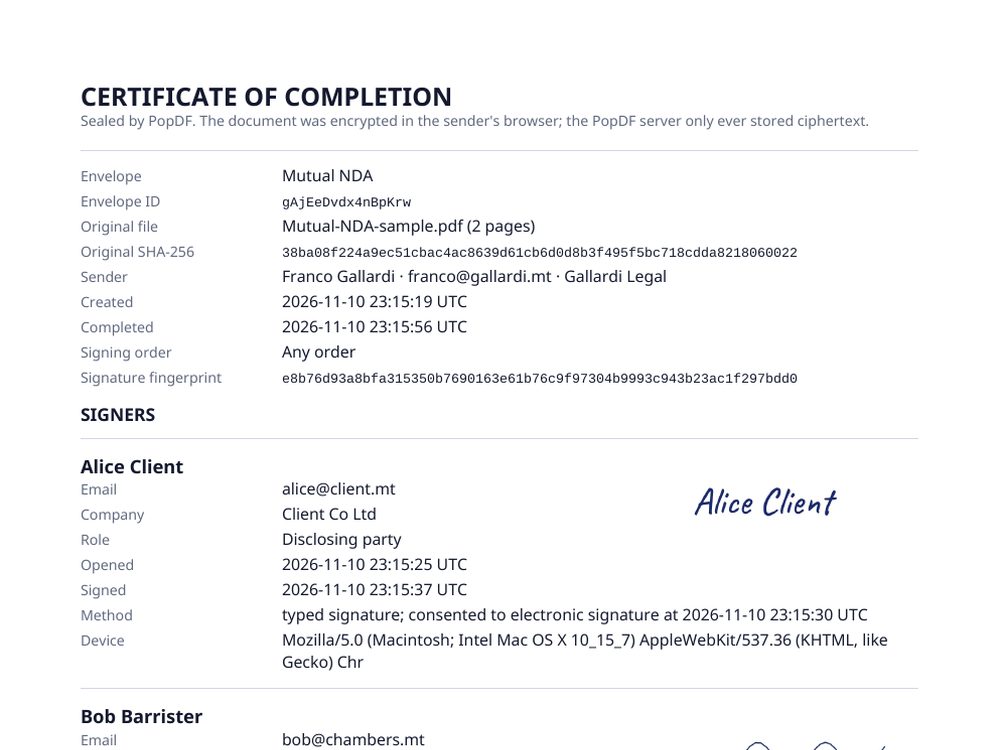
When the last person signs, anyone on the envelope can download the signed and sealed doc: signatures burned in, plus a certificate of completion with an audit trail and SHA-256 fingerprints. Every party's copy is byte-identical. Then the envelope pops on the schedule you chose, and nothing is left.

  • Pop after 1 to 365 days, or right now
  • Unsigned docs expire after 7 to 90 days
  • Your copy is your record
The certificate of completion page in a sealed PDF, listing signers, timestamps and document hashes
The privacy model

The link
is the lock.

There's no clever promise here, just arithmetic. We never hold the key, so we can't open the box.

1 · Your browser

Encrypts the PDF

A fresh 256-bit key is generated on your device. The contract, fields and signer list are locked with AES-256-GCM before anything is uploaded.

NDA-Acme.pdf → 🔒 sealed locally
2 · The private link

Carries the key

The key is in each signer's link. Browsers never send that part to any website, so it never reaches us.

popdf.app/app/#/k/pM-NpYtyWfczZgX…
3 · Our server

Sees gibberish

We store ciphertext, hashed access tokens and simple status flags (sent, opened, signed). Not the text, not the names, not the signatures.

x9QmA2+v7Lr0Zt…w4= (unreadable)
256-bitAES-GCM key per envelope, generated in your browser
0 bytesof readable contract text ever stored by PopDF
1–365days after completion until the envelope pops, your choice
100%identical sealed copies for every party, checked by SHA-256

Read how the security works

Everything you expect

All the e-sign
essentials. None of the complications.

Sealed PDF with a certificate of completion

Signatures and values are burned into the doc or PDF, followed by a certificate page: who signed, when, how they consented, which device, the full audit trail, and SHA-256 fingerprints of the original and the signed file. Anyone can check their copy matches the sealed version.

Type, draw or upload

Three handwriting styles, a smooth drawing pad that works with a finger or stylus, or upload a scan of your own signature.

Signing order

Let people sign in any order, or set a strict sequence. Later signers see a friendly "not your turn yet" screen, and the server refuses early signatures.

Details fill themselves

Signers type their name, company and address once; PopDF remembers these details in their browser and drops them into the right fields, and everything stays editable.

Share any way

Copy the link, copy a ready-written message, open your email, send by WhatsApp, or show a QR code across the table.

Edit and agree first

Upload a Word document and edit it together with the other side, version by version, until everyone presses Agree. Then it becomes signable.

Exactly what you agreed

When a signer opens the PDF, PopDF rebuilds it from the agreed wording and checks it matches, byte for byte. Anything else gets a clear "do not sign".

Made for phones

On a phone, signers are taken through their fields one at a time, with big buttons and inputs, and the page shows where each one goes.

Every European language

Names, companies and wording in Maltese, Greek, Cyrillic, Polish and every other European language come through on the PDF and the certificate.

Your logo on the sealed copy

Add your logo and a watermark such as CONFIDENTIAL when you send. They go on the final sealed PDF, and signers are told before they sign.

Checked before it's sent

PDFs and Word files are checked on upload: damaged or locked files are turned away, and scripts or attachments that could run by themselves are removed.

Live sender dashboard

See each signer's status (link ready, opened, signed or declined), a countdown to when it pops and a timestamped activity log. Re-share a link, send a reminder, download the original, or pop the whole envelope with one click.

Decline with a reason

A signer can say no and tell you why. The reason is encrypted too: only the people on the envelope can read it. The envelope closes for everyone, so nobody signs an outdated version.
Side by side

PopDF vs the
usual way.

 PopDFTypical e-signature service
Who can read your contractOnly the people holding a linkYou, your signers and the provider
Where the keys liveIn the link, never on our serversOn the provider's servers
After signingEnvelope deletes itself on your scheduleKept in the provider's cloud, often indefinitely
Sealed PDF + audit certificateIncludedUsually included
Made for

People with
things to sign.

Law firms

Client engagement letters, NDAs and settlement terms that should never sit in a third party's cloud or be sprayed across email. PopDF just gets the signatures and leaves.

"Privileged stays privileged."

Founders

Term sheets, SAFEs, option grants and board consents, signed from a phone between meetings, without a monthly seat licence.

"Sent it from the taxi."

Freelancers

Statements of work and contractor agreements. Signed from any phone, with the same sealed copy for you and your client.

"Looks like I've got a legal team."

HR & people teams

Offer letters and policy acknowledgements that contain salaries and personal data you'd rather not spread around.

"Salary details, not shared."

Landlords & agents

Tenancy agreements and inventories signed on the doorstep with a QR code. Everyone walks away with the same sealed copy.

"Signed before the kettle boiled."

Fintech & finance

Mandates, onboarding forms and side letters, where data minimisation isn't a nice-to-have but a regulatory expectation.

"Data minimisation, by design."
Pricing

In beta.

PopDF is in beta. Three plans are on the way: Personal, Professional, and Teams & Firms. See what each includes and the beta pricing.

See plans Get started

Questions

Asked &
answered.

Something else? Email technical@liqtek.com.

Is an e-signature from PopDF legally binding?

In the UK and the EU, a contract can't be refused just because it was signed electronically. PopDF creates what the law calls a simple electronic signature, which is fine for most commercial agreements: NDAs, engagement letters, statements of work, offer letters, most supplier and customer contracts.

Some documents need more: wills, lasting powers of attorney, some property deeds and anything that must be witnessed. If you're unsure, ask your lawyer. More on legal validity.

Do I need an account?

No. Signers sign as guests and need nothing. To send, you confirm your email address with a 6-digit code we email you: no account and no password, and 1 contract a month free. If you'd like every document you send, sign or agree in one list on all your devices, you can set that up too, with a passkey.

Can PopDF really not read my contract?

Correct. Your browser encrypts the PDF before uploading it, and the key only exists inside the private links. We store scrambled bytes that we have no way to unscramble.

What does "pop" mean?

Popping deletes the envelope: the encrypted document, every signature and the audit trail are wiped from our servers and every link stops working. You choose when: unsigned envelopes expire after 7 to 90 days, signed ones pop 1 to 365 days after the last signature, and you can pop one yourself at any time. Download your sealed copy first, because it's your only record.

What happens if I lose the link?

Because we never hold the key, we can't recover it. That's the trade-off for real privacy. When you send, PopDF lets you copy your owner link, email it to yourself or save it as a file, and it remembers it in that browser. If you set up your document list (with a passkey or recovery code), every document you send, sign or agree is there on all your devices. If a signer loses their link, re-share it or send a reminder from your owner’s dashboard.

Do my signers need an account?

No. Signers open their link, type their name and email (plus their company and address if the contract asks), and sign as guests. Those details fill in the contract and appear on the certificate. If you want proof of who signed, tick "signers must confirm their email" when you send: each signer then gets a 6-digit code at the address you gave before they can sign.

How much does it cost?

PopDF is in beta. The plans and beta pricing are on the pricing page.

Does PopDF email my signers?

PopDF never emails the signing links: you share each private link yourself, by email, WhatsApp, Teams, a QR code or whatever you already use, because a link carries the key to the document. PopDF does send short notices without links or document names: when someone signs or declines, when everyone has signed (download your copy before it pops), when a draft has a new version to review, and reminders you send to signers who haven't signed yet.

Who's behind PopDF?

PopDF is built by Liquid Technology Limited, a technology company registered in Malta (C105818) and based in Sliema. About us.

Your turn

Send one.
Watch it pop.